
Right now, some of the most talked about generative AI models are Large Language Models (LLMs), given the huge advances made in the field, going from generating a bit of text to acting as "agents" (LLMs that decide and interact with the real world, beyond a chat window) that build entire projects from scratch.
That made me curious about how this actually works, what the real pipeline looks like. Obviously at a much smaller scale if I wanted to do it myself, but the fundamentals are the same whether I do it or a frontier lab like Anthropic, OpenAI, or Google does it.
I'm not starting from zero. I already have experience trying to build my own LLMs in personal projects like:
-
Rivera-ai/ZeusLLM: Where I reimplemented and simplified the Llama 3 architecture, and built a minimal implementation of data preparation, training, and inference for the model. (Date: November 2024)
-
LLaDA-from-scratch: Where I implemented LLaDA, a diffusion model for natural language that, unlike traditional autoregressive models, learns to model the text distribution through a progressive masking process and its inverse reconstruction. I trained a minimal 310M parameter version for 200 steps, just to validate that the training and inference pipeline worked correctly end to end. (Date: July 2025)
This time my goal is, starting from a modern AI architecture, to understand the pipeline for pre-training the model and post-training, so this is replicable for anyone. At the end of this post I'll leave the GitHub repository with all the scripts used in the process of building TinyQwen, in case you want to reproduce it or adapt it to your own experiment.
Architecture
Before starting to pre-train the model, I began by researching architectures. I experimented with a few options, and in the end I settled on Qwen3.5, since it already comes with a hybrid architecture: it combines linear attention layers (Gated DeltaNet) with full attention layers in a fixed ratio, which keeps the memory footprint of running attention minimal, even over long contexts. It also comes with native multimodal capability built in, in case I wanted to pre-train a multimodal model down the line.
Something very important I wanted to have was integration with the Transformers ecosystem. This makes things much easier later on, during post-training, since I'd have access to libraries like trl, peft, and others to fine-tune the model.
I checked the architecture and saw that the smallest size the Qwen3.5 team offered was 0.8B, so I decided to go with that size:
import torchfrom transformers.models.qwen3_5.configuration_qwen3_5 import Qwen3_5TextConfigfrom transformers.models.qwen3_5.modeling_qwen3_5 import Qwen3_5ForCausalLMfrom transformers import AutoTokenizer
tok = AutoTokenizer.from_pretrained("Qwen/Qwen3.5-0.8B", trust_remote_code=True)
full_attention_interval = 4num_hidden_layers = 24
layer_types = [    "full_attention" if (i + 1) % full_attention_interval == 0 else "linear_attention"    for i in range(num_hidden_layers)]
config = Qwen3_5TextConfig(    vocab_size=248320,    hidden_size=1024,    intermediate_size=3584,    num_hidden_layers=24,    num_attention_heads=8,    num_key_value_heads=2,    head_dim=256,    layer_types=layer_types,    linear_conv_kernel_dim=4,    linear_key_head_dim=128,    linear_num_key_heads=16,    linear_num_value_heads=16,    linear_value_head_dim=128,    rms_norm_eps=1e-6,    rope_parameters={        "rope_type": "default",        "rope_theta": 10000000,        "partial_rotary_factor": 0.25,    },    tie_word_embeddings=True,)
model = Qwen3_5ForCausalLM(config)model.post_init()model = model.to(torch.bfloat16)
total_params = sum(p.numel() for p in model.parameters() if p.requires_grad)print(f"Total parameters: {total_params:,}")
tok.save_pretrained("./TinyQwen")model.save_pretrained("./TinyQwen")
Data collection
For the dataset, I used the Chinchilla scale as a reference point, settling on 15 billion tokens (following the ratio of roughly 20 tokens per parameter proposed in the Hoffmann et al., 2022 paper for compute-optimal training).
It's worth noting that this law is somewhat outdated by now: models like Llama 3 deliberately break it, training small models with far more tokens than Chinchilla would recommend, because they optimize for long-term inference cost instead of training cost.
There have also been important advances in data quality that reduce the number of tokens needed to reach the same performance. That said, if the goal is something serious at production scale, you're going to need well beyond 15 billion tokens. For this project I'm leaving both the base dataset and the already tokenized dataset open, in case anyone wants to replicate or continue the experiment.
Building the base dataset
For my use case, and since this is a minimal experiment, I decided to restrict the dataset languages to just English and Spanish. Researching on HuggingFace, I found OpenBMB/UltraX-Preview, a collection of English pre-training corpora refined with the UltraX framework, and HuggingFaceFW/FineWeb2, a multilingual web corpus built from Common Crawl, from which I pulled the Spanish subset.
From these two sources I built TinyQwen-Data, a unified dataset of roughly 15 billion tokens:
| Language | Documents | Tokens |
|---|---|---|
| English | 15,480,886 | 11,250,004,580 |
| Spanish | 4,866,465 | 3,750,000,277 |
| Total | 20,347,351 | 15,000,004,857 |
The dataset is published openly, along with its full data card (sources, statistics, limitations, and citations).
Tokenizing the dataset
A very common practice in the industry is to tokenize the dataset ahead of time, meaning converting all the text you've collected into the input the model actually needs: tokens. This cuts training costs, since the GPU doesn't have to wait around for text to be converted into tokens.
For this task I wrote a script that tokenizes the dataset and saves it in blocks. I settled on a block size of 2048 tokens, since it was a good starting point for training the model, making the most of GPU memory without wasting any GB.
In experiments with larger blocks, like 8192, I could only use a batch size of 2, using barely 75GB out of the 140GB of VRAM on an H200. Going any higher gave OOM (Out Of Memory) errors.
import jsonimport osfrom multiprocessing import cpu_count
from datasets import Features, Sequence, Value, load_datasetfrom transformers import AutoTokenizer
DATASET_NAME = "Aquiles-ai/TinyQwen-Data"TOKENIZER_NAME = "Qwen/Qwen3.5-0.8B"OUT_DIR = "./data/tinyqwen_arrow"BLOCK_SIZE = 2048VAL_FRACTION = 0.0005NUM_PROC = max(1, cpu_count() - 1)GROUP_BATCH_SIZE = 2000  # concatenated documents before chunking into blocks

def main():    os.makedirs(OUT_DIR, exist_ok=True)
    tok = AutoTokenizer.from_pretrained(TOKENIZER_NAME, trust_remote_code=True)    if tok.eos_token_id is None:        raise ValueError("The tokenizer does not have eos_token_id defined")
    vocab_size = 248320    if vocab_size > 2**31 - 1:        raise ValueError(f"vocab_size={vocab_size} does not fit in int32, use int64")
    print(f"vocab_size={vocab_size}  eos_id={tok.eos_token_id}  block_size={BLOCK_SIZE}")
    dataset = load_dataset(DATASET_NAME, split="train")
    def tokenize_fn(batch):        ids = tok(batch["text"], add_special_tokens=False)["input_ids"]        return {"input_ids": [seq + [tok.eos_token_id] for seq in ids]}
    tokenized = dataset.map(        tokenize_fn,        batched=True,        batch_size=1000,        num_proc=NUM_PROC,        remove_columns=dataset.column_names,        desc="tokenizing",    )
    def group_texts(batch):        concatenated = []        for seq in batch["input_ids"]:            concatenated.extend(seq)        total_len = (len(concatenated) // BLOCK_SIZE) * BLOCK_SIZE        concatenated = concatenated[:total_len]        chunks = [concatenated[i : i + BLOCK_SIZE] for i in range(0, total_len, BLOCK_SIZE)]        return {"input_ids": chunks}
    packed = tokenized.map(        group_texts,        batched=True,        batch_size=GROUP_BATCH_SIZE,        num_proc=NUM_PROC,        remove_columns=tokenized.column_names,        features=Features({"input_ids": Sequence(Value("int32"), length=BLOCK_SIZE)}),        desc=f"packing into {BLOCK_SIZE}-token blocks",    )
    split = packed.train_test_split(test_size=VAL_FRACTION, seed=1337, shuffle=True)    split["val"] = split.pop("test")
    split["train"].save_to_disk(os.path.join(OUT_DIR, "train"))    split["val"].save_to_disk(os.path.join(OUT_DIR, "val"))
    manifest = {        "dataset_name": DATASET_NAME,        "tokenizer_name": TOKENIZER_NAME,        "vocab_size": vocab_size,        "eos_id": tok.eos_token_id,        "block_size": BLOCK_SIZE,        "n_train_blocks": len(split["train"]),        "n_val_blocks": len(split["val"]),    }    with open(os.path.join(OUT_DIR, "manifest.json"), "w") as f:        json.dump(manifest, f, indent=2)
    print(f"train: {len(split['train']):,} blocks  val: {len(split['val']):,} blocks")    print(f"Saved to {OUT_DIR}")

if __name__ == "__main__": main()group_texts runs separately on each batch of size GROUP_BATCH_SIZE (since batched=True is used). The leftover tokens that don't complete a full BLOCK_SIZE block get dropped at the end of each batch, not just at the end of the whole dataset. At this scale it's a marginal loss (about 0.1% of the corpus), but it's a conscious simplification in the script.
What hardware to use? Cost-efficiency benchmark
Before starting to train the model, I had to figure out the best cost-efficiency setup, because the budget I have access to is very limited. The platform I regularly use for AI workloads is Modal.
For this project I decided to test between an NVIDIA H200 and an NVIDIA B200:
| GPU | Cost/Hour ($) |
|---|---|
| H200 | 4.54/h |
| B200 | 6.25/h |
I wrote a script called bench_train.py, which would launch a minimal training run to figure out which of these setups was the best option:
| GPU | Num |
|---|---|
| H200 | 1 |
| H200 | 2 |
| B200 | 1 |
The script was set up with 100 training steps, a batch size of 14, and grad_accum_steps of 1, so I could figure out the average time per step, peak memory, and other important numbers.
After running the script across the different setups, and taking into account that a full epoch is 15,002,423,296 tokens, I got this table:
| Config | Time/epoch | Cost/epoch | Tokens per dollar |
|---|---|---|---|
| B200 x1 | 69.3 h (2.88 days) | $432.84 | 34.66M |
| H200 x1 | 92.8 h (3.87 days) | $421.45 | 35.60M |
| H200 x2 | 47.7 h (1.99 days) | $432.83 | 34.66M |
This shows that the H200 x1 setup is the one with the best cost-efficiency ratio (most tokens processed per dollar spent), so that's the one I'm going to use. Even though H200 x2 finishes an epoch nearly 2x faster, the cost per epoch is practically the same as B200 x1, so H200 x1 is the cheapest option in absolute terms.
Given the limited budget I have, I'm not going to complete a full epoch (that would take almost 4 days of continuous compute). Instead, the actual training run I'm going to do is only 2 to 3 hours, just to validate that the whole pipeline works end to end and to see how the loss behaves in that window, not to reach convergence.
Pre-training
Setting up the environment
We'll set up the Modal environment by downloading both the training script and the dataset with this script:
import modalfrom pathlib import Path
URL_TRAIN_SCR = "https://raw.githubusercontent.com/Aquiles-ai/TinyQwen/refs/heads/main/pre-training/train.py"
image = (    modal.Image.from_registry("nvidia/cuda:13.0.0-devel-ubuntu24.04", add_python="3.12")    .apt_install("git", "curl", "build-essential",)    .entrypoint([])    .run_commands(        "python -m pip install --upgrade pip",        "python -m pip install --upgrade setuptools wheel"    )    .uv_pip_install(        "transformers==5.14.0",        "datasets",        "torch==2.9",        "torchvision",        "kernels",        "packaging",        "ninja",        "wandb"    )    .env({"HF_XET_HIGH_PERFORMANCE": "1"})  )
hf_cache_vol = modal.Volume.from_name("huggingface-cache", create_if_missing=True)data = modal.Volume.from_name("data", create_if_missing=True)app = modal.App("dw-train-tiny")
@app.function(    image=image,    secrets=[modal.Secret.from_name("huggingface-secret")],    volumes={        "/root/.cache/huggingface": hf_cache_vol,        "/root/.local/share": data,    },)def dw():    from huggingface_hub import snapshot_download    import requests
    data_dir = Path("/root/.local/share/data")    script_dir = Path("/root/.local/share")
    scr = script_dir / "train.py"
    scr.parent.mkdir(exist_ok=True)
    response = requests.get(URL_TRAIN_SCR)    response.raise_for_status()    scr.write_bytes(response.content)
    snapshot_download(repo_id="Aquiles-ai/TinyQwen-Data-Tokenized",         repo_type="dataset", local_dir=data_dir)
@app.local_entrypoint()def main():    print("Starting download")
dw.remote().add_local_file(), but that means rebuilding the image every time the training script changes. To iterate faster, I prefer downloading it at runtime into a persistent volume, so I can update train.py in the repo without having to rebuild the image on every change.
Training script
With the environment set up and the dataset downloaded onto the volume, next comes the train.py script, which runs the full training loop. It supports both single GPU and multi GPU via DDP (launched with torchrun), and was designed so it could be paused and interrupted without losing progress.
"""Training script (single or multi GPU via DDP) for the TinyQwen model.
Single GPU usage:    python train.py
Multi GPU usage (e.g. 2xH200), via DDP:    torchrun --nproc_per_node=2 train.py"""
import jsonimport mathimport osimport timefrom contextlib import nullcontextimport torchimport torch.distributed as distimport wandbfrom datasets import load_from_diskfrom torch.nn.parallel import DistributedDataParallel as DDPfrom torch.nn.utils import clip_grad_norm_from torch.utils.data import DataLoader, DistributedSamplerfrom transformers import AutoTokenizerfrom transformers.models.qwen3_5.configuration_qwen3_5 import Qwen3_5TextConfigfrom transformers.models.qwen3_5.modeling_qwen3_5 import Qwen3_5ForCausalLM
# General configurationDATA_DIR = "/root/.local/share/data"CHECKPOINT_DIR = "/root/.local/share/checkpoints"RESUME = True  # if there is a checkpoint in CHECKPOINT_DIR, resume from there
TOKENIZER_NAME = "Qwen/Qwen3.5-0.8B"VOCAB_SIZE = 248320BLOCK_SIZE = 2048
# Training configurationBATCH_SIZE = 14GRAD_ACCUM_STEPS = 1EPOCHS = 1MAX_STEPS = NoneWARMUP_STEPS = 200LR = 3e-4MIN_LR = 3e-5WEIGHT_DECAY = 0.1GRAD_CLIP = 1.0USE_COMPILE = FalseUSE_GRADIENT_CHECKPOINTING = True
# Evaluation and checkpointsEVAL_EVERY = 500EVAL_STEPS = 50SAVE_EVERY = 500LOG_EVERY = 10
A few decisions worth explaining before getting into the loop:
DDP instead of FSDP. With a 0.8B model, the parameters, gradients, and optimizer states fit comfortably in the VRAM of a single H200/B200, so there's no need to shard the model across GPUs. setup_distributed() detects whether the script was launched with torchrun (by checking RANK in the environment variables) and decides whether to initialize the NCCL process group or run in single GPU mode, without needing to maintain two separate scripts.
Gradient checkpointing on by default. Since the block size is 2048 tokens and the batch per GPU is 14, recomputing activations during the backward pass instead of storing all of them saves enough memory to avoid lowering the batch size, at the cost of a bit more compute time.
MAX_STEPS calculated, not fixed. Instead of hardcoding the number of steps, the script computes the effective batch (BATCH_SIZE x GRAD_ACCUM_STEPS x world_size), divides it by the size of the tokenized dataset, and multiplies by EPOCHS. That way, if I switch from 1 to 2 GPUs, or adjust grad accumulation, I don't have to recalculate by hand how many steps correspond to a full epoch.
Cosine schedule with linear warmup. get_lr() ramps up linearly from 0 to LR over WARMUP_STEPS, then decays following a cosine curve down to a floor of MIN_LR, instead of dropping to 0, to avoid the model completely stopping learning during the last steps.
Checkpoints in Transformers format. save_checkpoint() saves the model using save_pretrained(), which lets you reload it later directly with Qwen3_5ForCausalLM.from_pretrained(ckpt_dir) or upload it as-is to HuggingFace. The optimizer state and current step are saved separately, in training_state.pt, since they aren't part of the standard Transformers format but are needed to resume training without losing momentum.
no_sync() during gradient accumulation. When GRAD_ACCUM_STEPS > 1 in distributed mode, every micro-step performs an all_reduce of gradients across GPUs, which is unnecessary until the very last micro-step before optimizer.step(). The script wraps the intermediate micro-steps in model.no_sync() to avoid that extra communication.
for micro_step in range(GRAD_ACCUM_STEPS):    batch, data_iter = get_next_batch(data_iter, train_loader, train_sampler, epoch_counter)    batch = batch.to(device, non_blocking=True)
    is_last_micro_step = micro_step == GRAD_ACCUM_STEPS - 1    sync_ctx = (        model.no_sync()        if (is_distributed and not is_last_micro_step)        else nullcontext()    )
    with sync_ctx:        out = model(input_ids=batch, labels=batch)        loss = out.loss / GRAD_ACCUM_STEPS        loss.backward()
Logging to wandb with a custom metric. Instead of letting wandb use its internal step, I define optim_step as the base metric and group everything under train/*, eval/*, and perf/*. This lets me log loss, perplexity, learning rate, gradient norm, tokens per second, and peak memory, all aligned on the same X axis, without things getting out of sync if train and eval logging happen at different steps.
perplexity_from_loss(), which applies a min(loss, 20.0) before exponentiating. At the start of training the loss can be high and exp() blows up to infinity, which breaks the chart scale in wandb without adding any useful information.
Running the pre-training
With train.py ready, all that's left is the script that launches it on Modal. For this I used launch_train.py, which packages the image with all the necessary dependencies (including causal-conv1d, flash-linear-attention, and tilelang, required by Qwen3.5's linear attention layers), mounts the persistent volumes with the dataset and checkpoint cache, and runs the training on an H200 x1, the winning setup from the cost-efficiency benchmark.
"""Script to launch training on Modal.
Usage:    modal run launch_train.py"""
import modalimport subprocessimport threadingimport timefrom pathlib import Path
image = (    modal.Image.from_registry("nvidia/cuda:13.0.0-devel-ubuntu24.04", add_python="3.12")    .apt_install("git", "curl", "build-essential",)    .entrypoint([])    .run_commands(        "python -m pip install --upgrade pip",        "python -m pip install --upgrade setuptools wheel"    )    .uv_pip_install(        "transformers==5.14.0",        "datasets",        "torch==2.9",        "torchvision",        "kernels",        "packaging",        "ninja",        "wandb"    )    .env({"HF_XET_HIGH_PERFORMANCE": "1",    "PYTORCH_ALLOC_CONF": "expandable_segments:True",    "TORCH_CUDA_ARCH_LIST": "9.0a;10.0a"    }).run_commands(        "MAX_JOBS=4 pip install causal-conv1d --no-build-isolation",        "pip install flash-linear-attention",        "pip install tilelang"    ))
hf_cache_vol = modal.Volume.from_name("huggingface-cache", create_if_missing=True)data = modal.Volume.from_name("data", create_if_missing=True)app = modal.App("test-train-tiny")
N_GPU = 1SCR_TR = "train.py"DIS = FalseMAX_USE_MODAL = TrueMINUTES = 15
def get_time_for_gpu_use(max_use_modal: bool, minutes: int) -> int:    if max_use_modal:        return 86400    return minutes * 60
class VRAMMonitor:    def __init__(self, interval=0.5, gpu_index=0):        self.interval = interval        self.gpu_index = gpu_index        self.monitoring = False        self.thread = None     def _query_nvidia_smi(self):        out = subprocess.check_output(            [                "nvidia-smi",                f"--id={self.gpu_index}",                "--query-gpu=memory.used,memory.total,utilization.gpu",                "--format=csv,noheader,nounits",            ],            timeout=5,        )        used_mb, total_mb, util_pct = out.decode().strip().split(", ")        return float(used_mb) / 1024, float(total_mb) / 1024, float(util_pct)     def _monitor_loop(self):        while self.monitoring:            try:                used_gb, total_gb, util_pct = self._query_nvidia_smi()                print(                    f"[VRAM Monitor] used={used_gb:.2f}GB total={total_gb:.2f}GB "                    f"gpu_util={util_pct:.0f}%"                )            except Exception as e:                print(f"[VRAM Monitor Error] {e}")             time.sleep(self.interval)     def start(self):        if not self.monitoring:            self.monitoring = True            self.thread = threading.Thread(target=self._monitor_loop, daemon=True)            self.thread.start()            print("[VRAM Monitor] Started")     def stop(self):        if self.monitoring:            self.monitoring = False            if self.thread:                self.thread.join(timeout=1)            print("[VRAM Monitor] Stopped")
TIME = get_time_for_gpu_use(MAX_USE_MODAL, MINUTES)
@app.cls(    image=image,    secrets=[modal.Secret.from_name("huggingface-secret")],    gpu=f"H200:{N_GPU}",    timeout=TIME,    scaledown_window=3600,    volumes={        "/root/.cache/huggingface": hf_cache_vol,        "/root/.local/share": data,    },)class LaunchTrain:    @modal.enter()    def check(self):        self.vram_monitor = VRAMMonitor(interval=0.5)        self.vram_monitor.start()        self.file = Path(f"/root/.local/share/{SCR_TR}")
        if self.file.is_file():            print("Exists")        else:            raise Exception("File does not exist")
    @modal.method()    def launch_train(self):        import subprocess
        cmd = [""]
        if DIS:            cmd = [                "torchrun",                "--nproc_per_node=2",                str(self.file)            ]        else:            cmd = [                "python",                str(self.file)            ]
        print(f"Command: {cmd}")
        subprocess.run(            cmd        )
@app.local_entrypoint()def main():    print("Starting training")
    tr = LaunchTrain()
    tr.launch_train.remote()
A couple of details from the script worth clarifying:
VRAMMonitor running on a separate thread. Modal does expose GPU metrics on its web dashboard, including GPU and power utilization, but they live on a separate tab in the interface, disconnected from the container's log stream. Instead of having to switch tabs to correlate VRAM usage directly with the rest of the training output, I preferred to log it myself. This class runs on an independent daemon thread, polling nvidia-smi every half second and logging the result, so it works no matter what script is running.
timeout set to the maximum allowed by Modal. The MAX_USE_MODAL variable controls whether the container timeout is 24 hours (86400 seconds, the maximum Modal allows) or a short value in minutes for quick tests. I left it as True so I wouldn't risk Modal killing the process halfway through the 2 to 3 hour mini training run.
DIS as a flag to choose between python and torchrun. Since train.py supports both single and multi GPU, this flag simply decides which command to use to launch it. With N_GPU = 1 and DIS = False, the command ends up being python train.py, without going through DDP.
Checking that the script exists before launching. In @modal.enter(), before running anything, it checks that train.py is already on the persistent volume (downloaded in the earlier environment setup step). If it's not there, the container fails early with a clear error, instead of failing later inside subprocess.run() with a less obvious message.
Pre-training metrics
After running pre-training for 2 hours and 7 minutes, we reached 11,070 steps with 317,399,040 total tokens seen out of the 15,000,004,857 total tokens, which is around 2.12% of the full dataset.
It's worth being upfront about what this section validates and what it doesn't: with barely 2% of the corpus covered, the model isn't anywhere close to a point where evaluating generation quality would make sense. What these metrics show is that the full pipeline (loading the tokenized dataset, forward/backward pass, checkpointing, logging to wandb, periodic evaluation) runs end to end without errors and behaves in a numerically healthy way, which was the real goal of this mini training run.
Training loss and perplexity
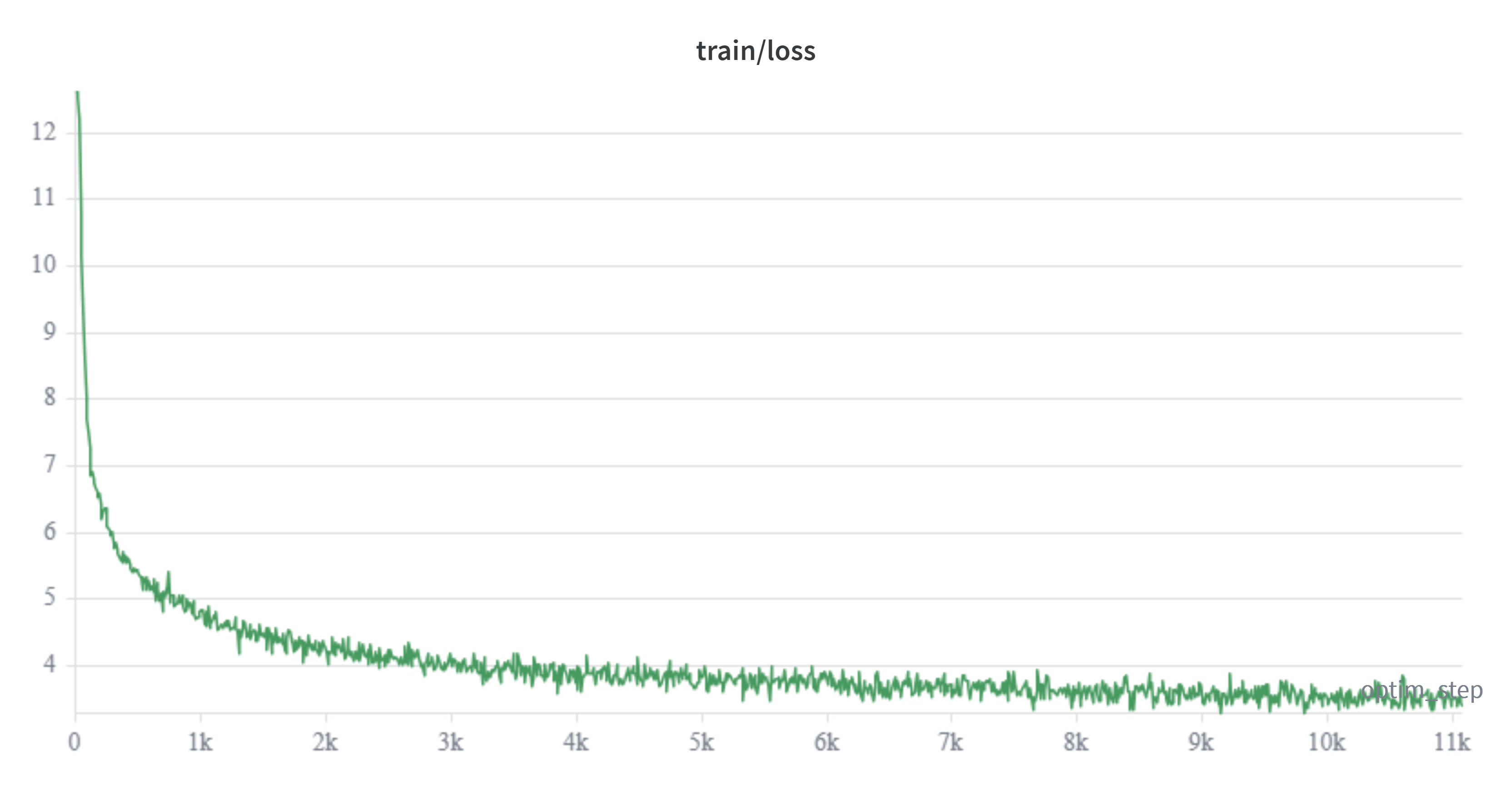
The loss dropped from 12.62 at step 0 (essentially random prediction over a 248,320-token vocabulary) to 3.40 at step 11,070. The steepest drop happens within roughly the first 1,500 steps, coinciding with the linear warmup of 200 steps and the period right after it. After that, the curve enters a phase of diminishing returns, as expected.
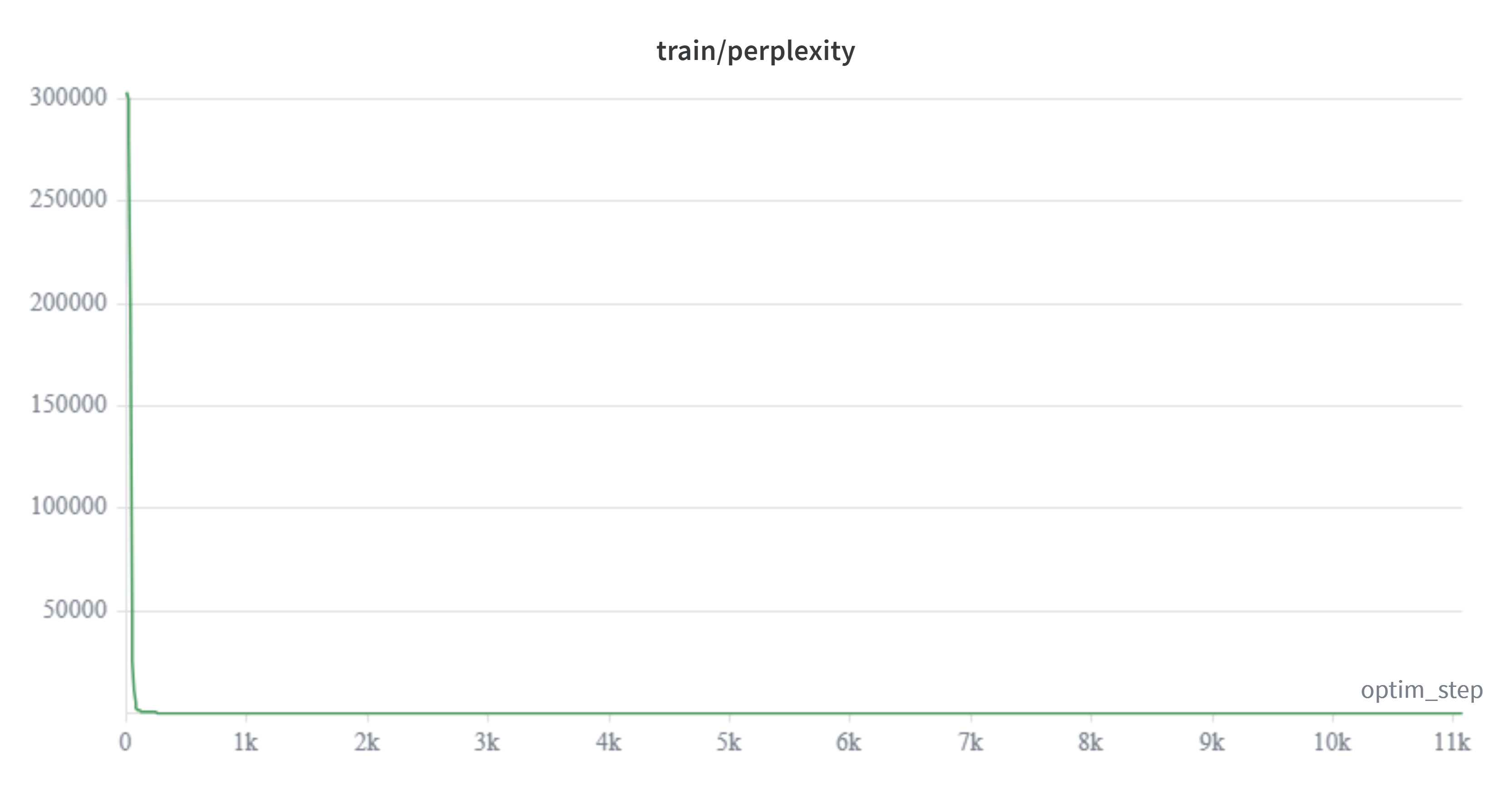
Perplexity follows the same trend as the loss, going from an initial value of over 300,000 down to around 30 by the end of the run.
Learning rate and gradient norm
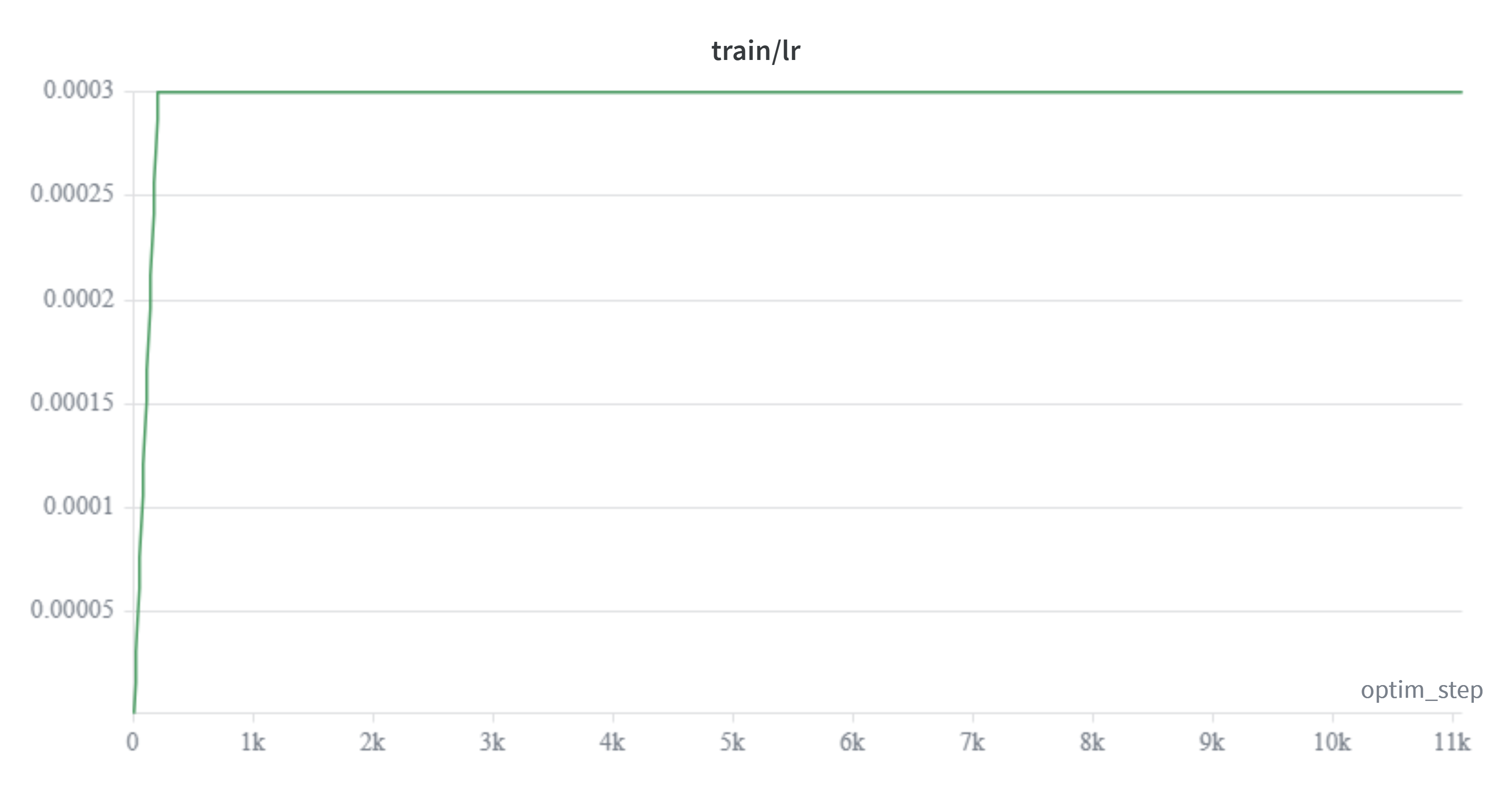 | 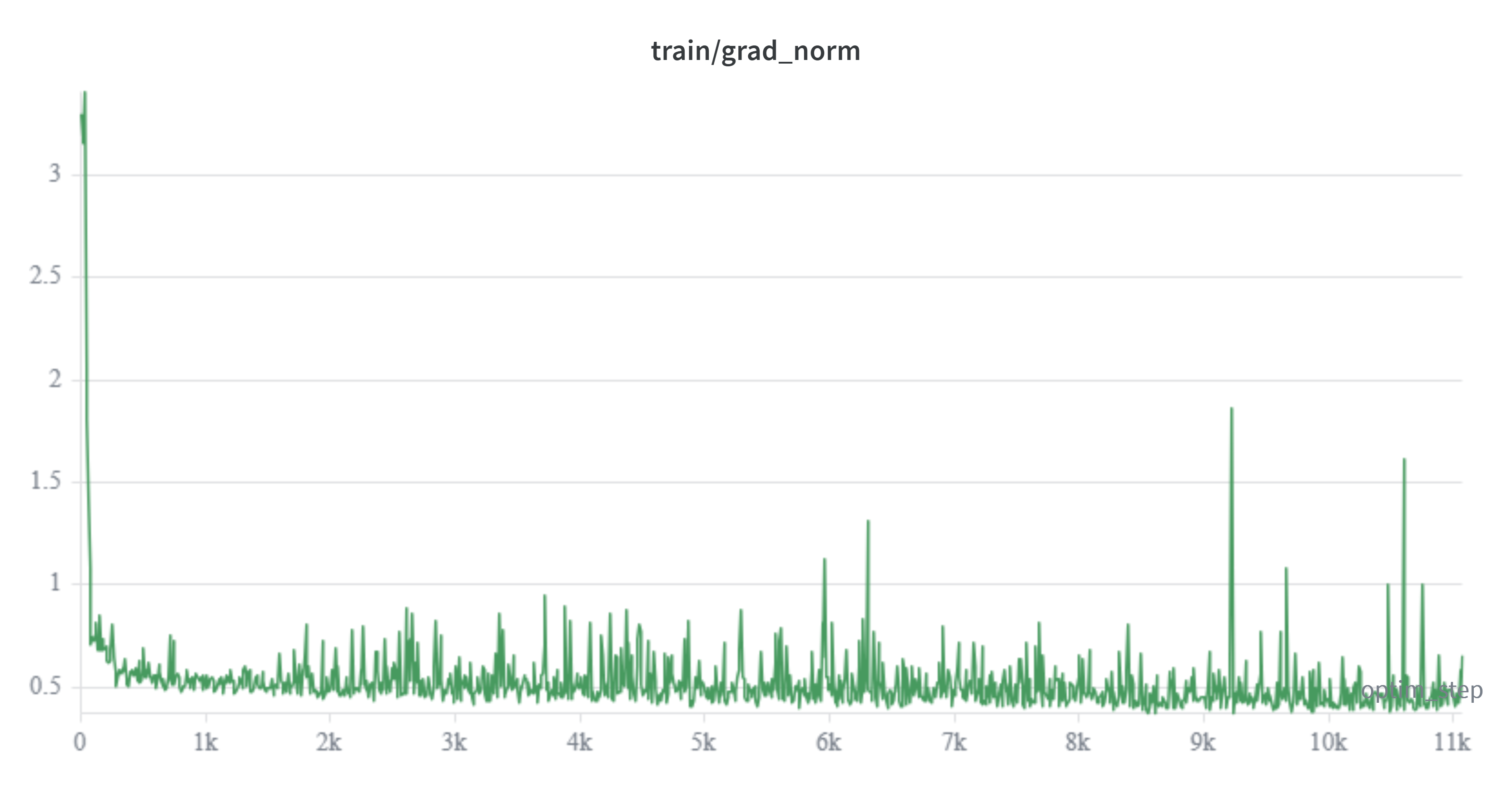 |
The learning rate follows the expected schedule: it rises linearly during the first 200 warmup steps up to 3e-4, and stays at that plateau for the rest of the run (at this scale of total steps, the cosine decay isn't perceptible yet). The gradient norm starts high during warmup, peaking at 3.41 at step 30, which is expected with freshly initialized weights and the learning rate still ramping up. Once warmup ends, the norm stabilizes around an average of 0.51 with normal noise between 0.4 and 0.6, but it isn't perfectly flat: there are five isolated spikes above 1.0 (steps 5,960 / 6,300 / 9,220 / 9,660 / 10,600), with the highest point of the run at 1.86 at step 9,220. These are isolated events with no visible cumulative effect on the loss, and they don't suggest sustained instability, but it's worth documenting rather than simplifying it as "stable with no spikes."
Validation loss and perplexity
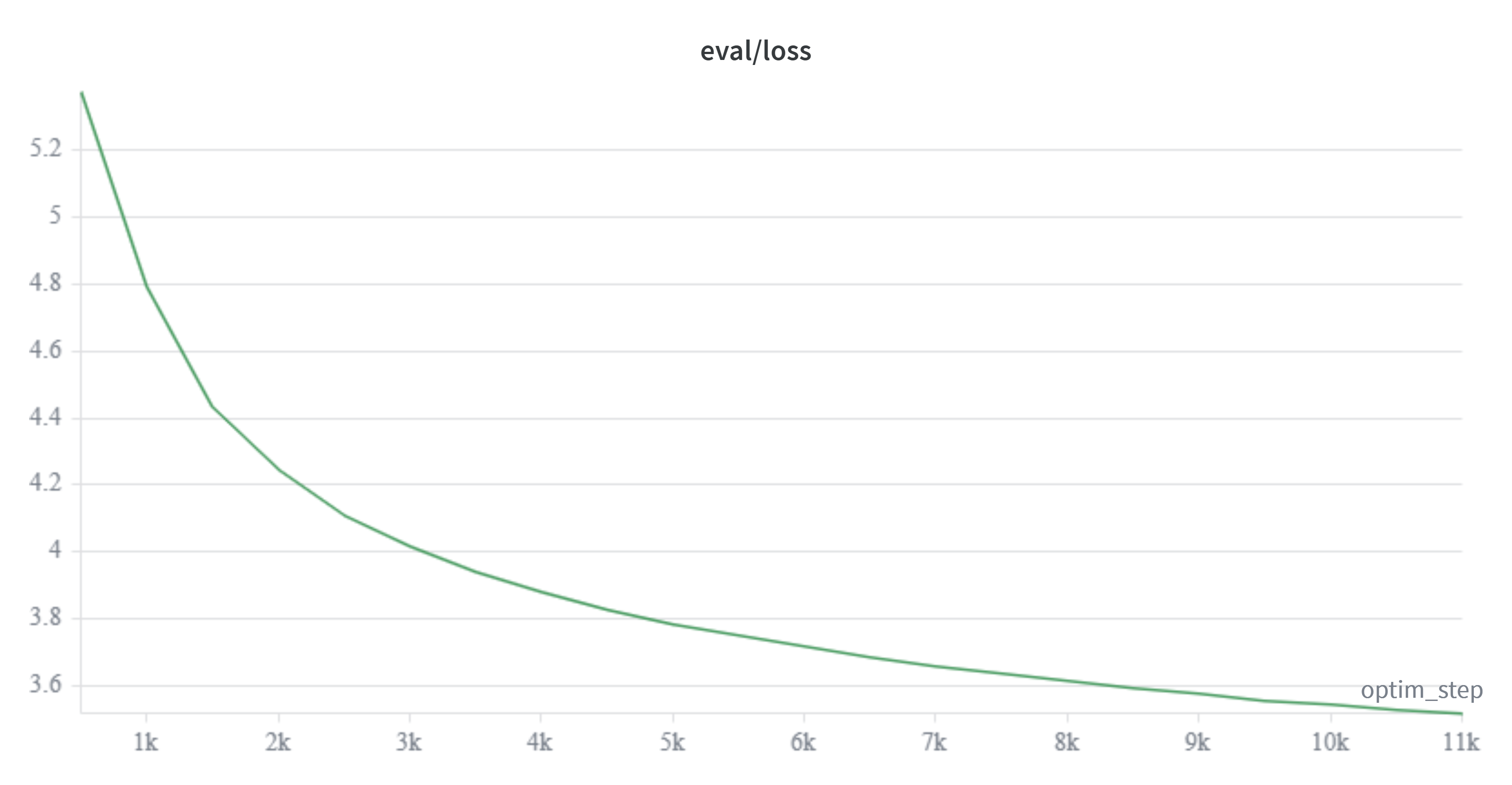
This is the most informative series of the run. eval/loss was measured every 500 steps on the validation set and drops monotonically across all 22 recorded evaluations, with no point where it goes back up, which rules out overfitting within this window:
| optim_step | eval/loss | eval/perplexity |
|---|---|---|
| 500 | 5.373 | 215.6 |
| 3,000 | 4.018 | 55.6 |
| 6,000 | 3.720 | 41.3 |
| 9,000 | 3.581 | 35.9 |
| 11,000 | 3.519 | 33.8 |

You can also see the curve flattening out toward the end of the run: between steps 500 and 3,000, eval/loss dropped 1.36 points, while between 6,000 and 11,000 (more than double the number of steps) it only dropped an additional 0.20 points. This is the typical behavior of a model coming out of the initial fast-learning phase, with the rest of the curve still ahead of it.
Hardware usage
Peak memory stayed at 105.998 GB out of the 140GB available on the H200, leaving a reasonable margin without hitting OOM errors, and consistent with what was observed in the earlier cost-efficiency benchmark. The actual average speed was 44,613 tokens per second, practically identical to what was recorded in the short benchmark tests (~44,800 tok/s), which confirms that bench_train.py accurately predicted the behavior of the real training run.
In terms of cost, the 2h07m of compute on the H200 at $4.54/hour comes out to roughly $9.62 for this experiment, and works out to about 33M tokens per dollar, in line with the 35.6M tokens/dollar estimated in the initial benchmark.
Model validation after pre-training
To validate that everything went correctly during pre-training, I'll run the following script. The model will generate garbage, but it'll help validate the integration with Transformers and see how it's doing having seen only 2.12% of the dataset.
from transformers import AutoTokenizer, AutoModelForCausalLM checkpoint_path = "checkpoints/step_11000"
tok = AutoTokenizer.from_pretrained(checkpoint_path)model = AutoModelForCausalLM.from_pretrained(checkpoint_path)model.to("cuda:0")model.eval()
prompt = "El clima en Madrid durante el invierno"tokens = tok(prompt, return_tensors="pt").to("cuda:0")
# Greedy decoding (default of generate)outputs_greedy = model.generate(**tokens, max_new_tokens=50)result_greedy = tok.decode(outputs_greedy[0], skip_special_tokens=True)print("\nGreedy:\n")print(result_greedy)
# With sampling, to compare whether the loop is an effect of the decoding or the modeloutputs_sampled = model.generate(    **tokens,    max_new_tokens=50,    do_sample=True,    temperature=0.8,    repetition_penalty=1.3,)result_sampled = tok.decode(outputs_sampled[0], skip_special_tokens=True)print("\nWith sampling:\n")print(result_sampled)
I used a plain completion prompt instead of the instruction chat template on purpose: the model hasn't gone through any post-training phase yet, so it has no notion of conversation turns or an assistant role. A completion prompt tests exactly what we're after (that the hybrid architecture generates text without errors at inference, and that the checkpoint saved with save_pretrained() can be reloaded without issues) without adding noise from a format the model never saw.
Here's the actual output:
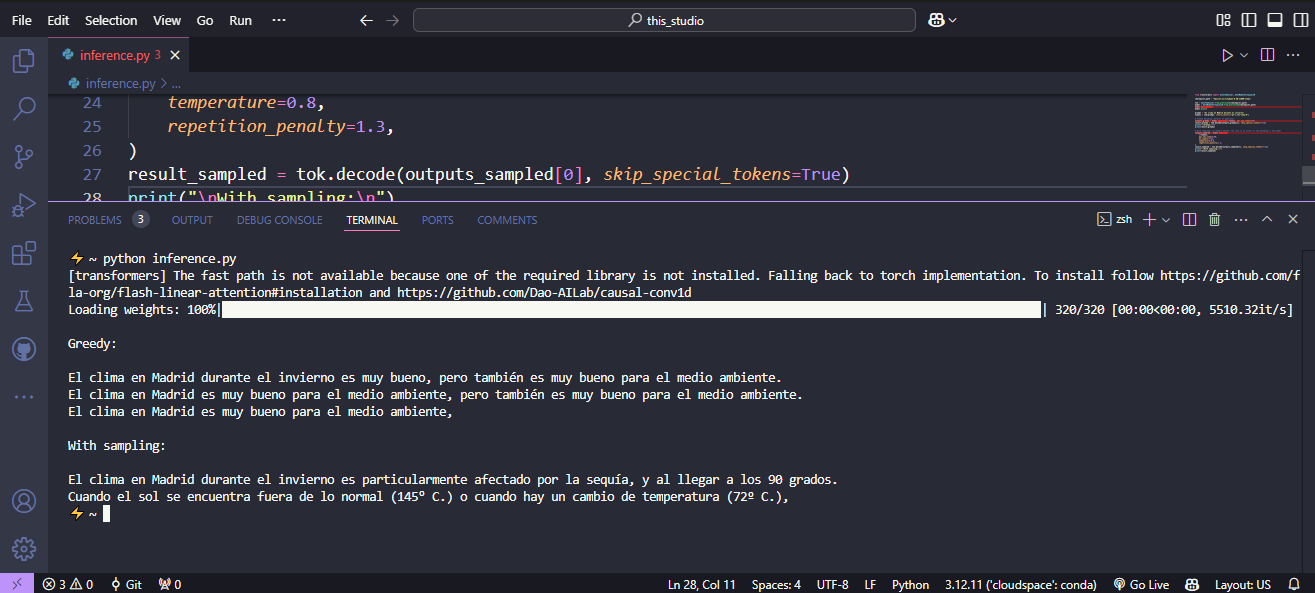
It's worth reading this carefully instead of just writing it off as "garbage": in both cases, gender and number agreement and word order in Spanish are correct throughout. What fails is the semantic content, and it fails in two different ways depending on the decoding method.
With greedy decoding (the model always picks the highest probability token), the result collapses quickly into a repetitive loop. This isn't purely an effect of having seen only 2.12% of the dataset: greedy decoding is prone to this kind of loop even in well-trained models, and the effect gets worse when the model's probability distribution is poorly defined, which is the case here.
With sampling (temperature=0.8, repetition_penalty=1.3) the loop disappears completely, but what shows up instead is what greedy decoding was hiding: the model has no real notion of the content it's generating. "90 degrees" in winter in Madrid, or temperatures of "145° C." and "72° C." mentioned as normal, make no climatic or physical sense at all. This is the expected signature of a model that, in 11,070 steps, has already learned the syntactic structure of Spanish, but that still doesn't have anywhere near enough signal (2.12% of one epoch) to attach coherent semantic content to that structure. Sampling doesn't fix the underlying problem, it just changes how it shows up: from empty repetition to fluent hallucination.
Post-training
Before getting into the SFT script, it's worth placing what I'm about to do within the broader post-training picture used in the industry, because what I'm covering in this post is only a small part of that picture, and I want to be explicit about what's left out.
Generally speaking, after pre-training, a lab aiming for an assistant-type (or agent-type) model tends to work on two fronts that are technically distinct, even though they're applied together:
1. Context window extension. The model is pre-trained with a fixed block size (2048 tokens, in our case), but the RoPE embeddings it uses to encode position don't generalize well beyond that length seen during training. To stretch the context without having to re-pre-train from scratch with longer blocks (very expensive), the technique that dominates today in open-source models is YaRN (Yet another RoPE extensioN method), presented by Peng et al. in 2023. YaRN combines an "NTK-by-parts" style interpolation (which scales RoPE frequencies differently depending on their range, instead of scaling them all equally like the original Positional Interpolation did) with a temperature adjustment on the attention logits. What's interesting for a project with a tight budget like this one is that its authors report achieving competitive context extension by fine-tuning on less than 0.1% of the data used in the original pre-training, and using 10 times fewer tokens and 2.5 times fewer steps than previous context extension methods.
2. Teaching the model to reason and to act. This is where the classic split between SFT and RL comes in:
- SFT (Supervised Fine-Tuning) trains the model on prompt-response pairs written or curated by humans (or generated by another model and filtered). It teaches format: how to respond as an assistant, how to follow instructions, how to use a chat template, how to call tools with the correct syntax.
- RL with verifiable rewards, typically with GRPO (Group Relative Policy Optimization) or one of its variants, is what's used to improve reasoning capability itself, not just the format. GRPO was introduced in the DeepSeekMath paper (Shao et al., 2024) and became popular with DeepSeek-R1: instead of training a separate value model (critic) like PPO does, GRPO samples a group of G responses for the same prompt, assigns each one a reward (for example, whether the result of a math problem is correct or not), and uses each response's relative position within that group as the advantage signal. This removes the need for PPO's critic model and significantly cuts the memory cost of training. Since then, variants have appeared that fix specific problems with GRPO, like DAPO (which addresses the case where every response in a group gets the same reward, which cancels out the advantage signal) or Dr. GRPO (which adjusts how the reward is normalized within the group to avoid length bias).
We're not covering either of these two techniques (YaRN or GRPO/derivatives) in this experiment. Extending context doesn't make sense yet at this scale of model and compute, and setting up an RL pipeline with verifiable rewards (which needs, at minimum, a generation environment, a reward verifier, and a lot more compute than what was already spent on pre-training) is beyond the scope of "understanding the basic pipeline" that I set out to do with TinyQwen. They're noted here because, if the goal were a real assistant rather than an educational experiment, this is exactly the point where more work would be needed.
What I am going to do is SFT with LoRA: freeze the base model's weights and train only a low-rank adapter on an instruction dataset, so I don't have to pay the cost of a full fine-tune again.
Dataset used
For this task I decided to use the ianncity/GLM-5.2-Conversation dataset, which contains 50,296 examples and around 120M tokens. Each question-answer pair includes explicit chain-of-thought reasoning, meaning the model should learn not just to answer, but to show the intermediate process before reaching the final answer.
Worth noting an inconsistency with the rest of the project: this dataset is exclusively in English, while the pre-training was done with a mix of English and Spanish. For this experiment that didn't seem critical to me, since the goal of the SFT here is only to validate the LoRA fine-tuning pipeline end to end, not to produce a bilingual instruction model. If the goal were production, I'd need to find (or build) an instruction dataset in Spanish, or at least bilingual, to avoid losing the capability the model actually developed during pre-training.
Honestly, this dataset's chain-of-thought reasoning isn't going to be put to good use given the incomplete pre-training: for a model to replicate coherent reasoning chains, it first needs the semantic relationships we talked about in the previous section, and that's exactly what's missing here. Even so, it works as a test of the LoRA pipeline.
With the dataset chosen, next comes the LoRA script.
Fine-tuning with LoRA
The full script (sft_lora.py) is available in the repo, so here I'll just go over the decisions that matter, not the full implementation.
Adapter size and scope. I used r=16 and lora_alpha=32, with target_modules pointing to q_proj, k_proj, v_proj, o_proj, gate_proj, up_proj, down_proj. It's worth clarifying something that follows directly from the hybrid architecture defined in the pre-training section: the names q_proj/k_proj/v_proj/o_proj only exist in the full_attention layers (1 out of every 4, based on the layer_types I built with full_attention_interval = 4), not in the linear attention layers (Gated DeltaNet). That means LoRA only adapts attention in 6 out of the model's 24 layers; in the rest, the adapter only touches the MLP (gate_proj/up_proj/down_proj), which is present in every layer.
Dataset reduced on purpose. Even though GLM-5.2-Conversation has 50,296 examples, the script limits the training set to total_size_dataset=5000 (with a 1% validation split), leaving around 4,950 training examples and around 503 for evaluation. This isn't an oversight, for this experiment the goal is only to validate that the LoRA pipeline runs end to end, not to do a serious SFT, so I kept the dataset small on purpose. The parameter is left there as a knob for anyone who wants to expand it to the full dataset.
Effective batch and steps. per_device_train_batch_size=4 with gradient_accumulation_steps=16 gives an effective batch of 64. With max_steps=220, that's 14,080 examples processed in total over a base of around 4,950, meaning the trainer makes just under 3 passes over the same subset instead of a single pass. Again, consistent with the goal: seeing how the fine-tuning behaves over a short run, not reaching convergence.
Learning rate and schedule. lr=2e-4 with lr_scheduler_type="cosine" and warmup_steps=50, over a max_grad_norm=0.8 (more conservative than the 1.0 used in pre-training, since LoRA on an already-initialized model is more sensitive to large gradients).
Hardware. For this fine-tune I dropped down to an H100 instead of the H200 used for pre-training. LoRA is lightweight enough (combined with the model's 0.8B size) that it doesn't need the more capable GPU from the benchmark section, so using a lower-capacity GPU cuts the cost to $3.95/hour, versus the H200's $4.54/hour.
Fine-tuning metrics
I ran the fine-tune for the defined 220 steps, with eval every 50 steps on the 1% validation split (around 503 examples). The full run took 27 minutes and 35 seconds on the H100, at a cost of roughly $1.82.
Training and validation loss
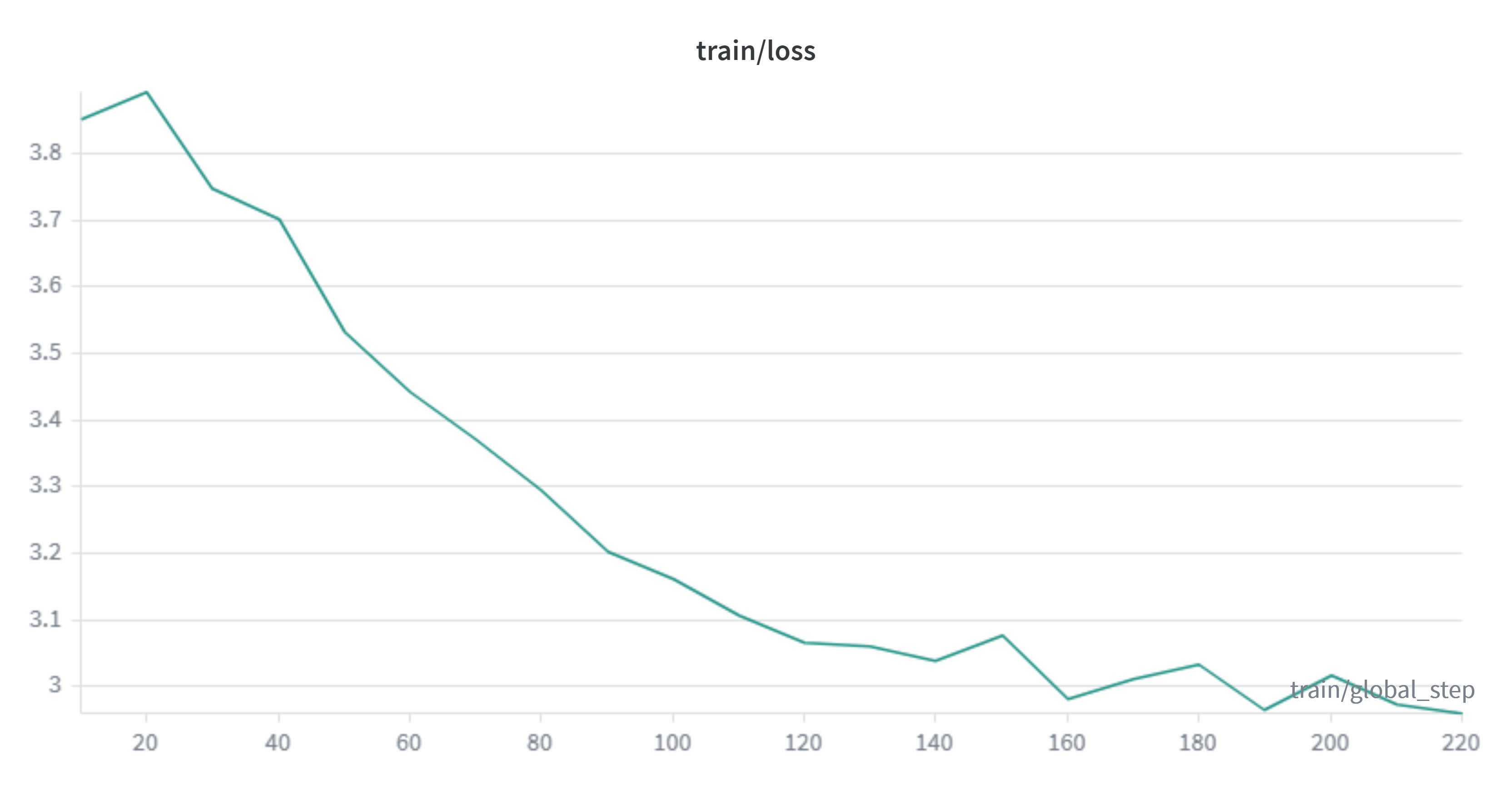 | 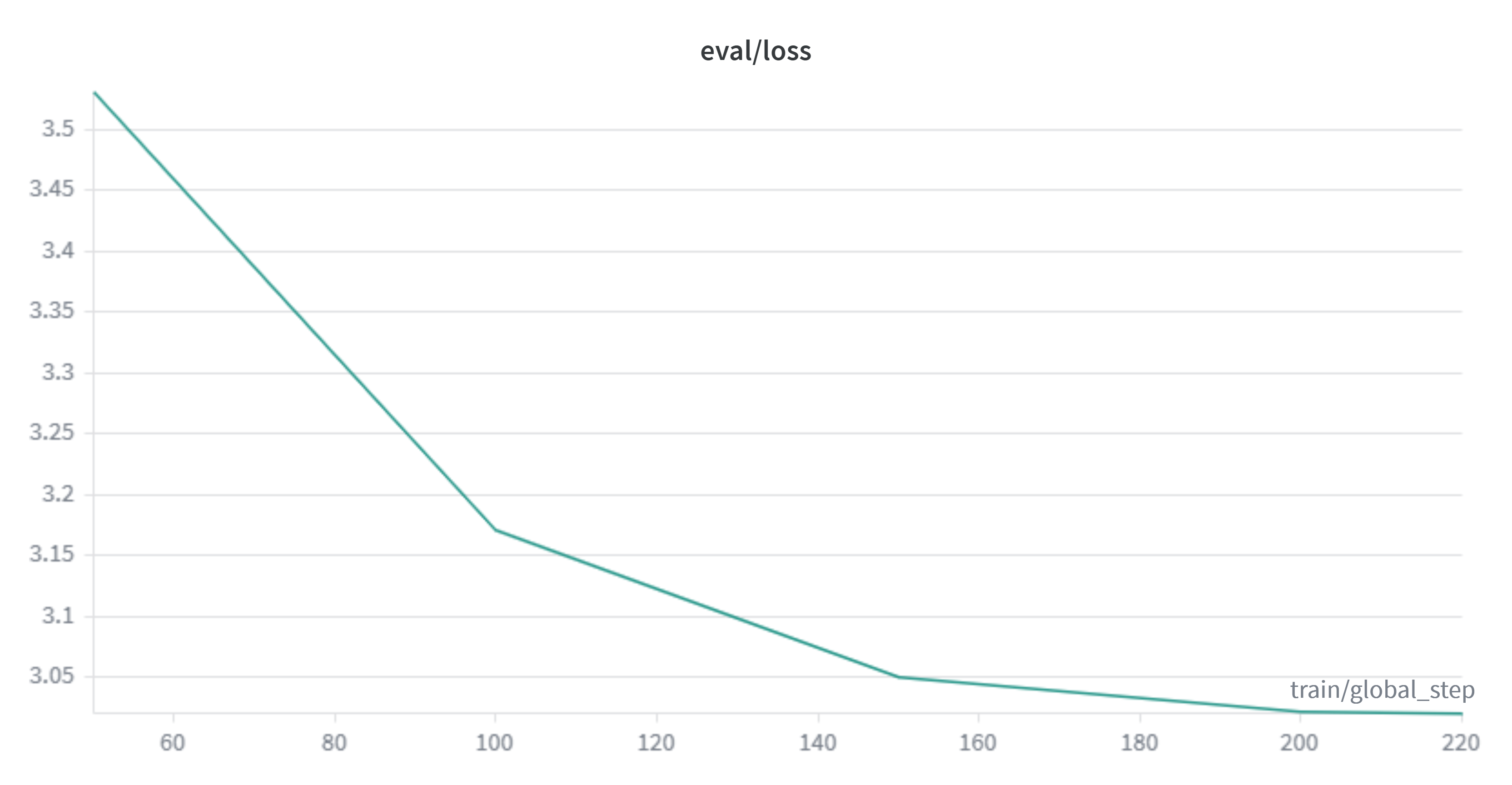 |
train/loss drops from 3.85 at step 10 to 2.96 at step 220, but unlike the pre-training curve, it isn't monotonic here: it oscillates between 2.96 and 3.08 through the whole final stretch (steps 130 to 220). That's expected with a small effective batch running over the same subset of around 4,950 examples multiple times: each epoch repeats the same samples, so gradient noise doesn't average out against new data the way it does in pre-training.
eval/loss tells the clearer story, just like in pre-training:
| step | eval/loss | eval/mean_token_accuracy |
|---|---|---|
| 50 | 3.531 | 0.462 |
| 100 | 3.172 | 0.498 |
| 150 | 3.050 | 0.514 |
| 200 | 3.022 | 0.519 |
| 220 | 3.021 | 0.519 |
The drop is almost entirely concentrated in the first 100 steps (-0.359 between 50 and 100); between step 200 and 220, eval/loss barely moves at all (-0.0009). With a training dataset of around 4,950 examples and nearly 3 full passes over it, the model had already extracted all the format signal it could get from that subset: running more steps at this dataset size wasn't going to move the needle much further.
Mean token accuracy
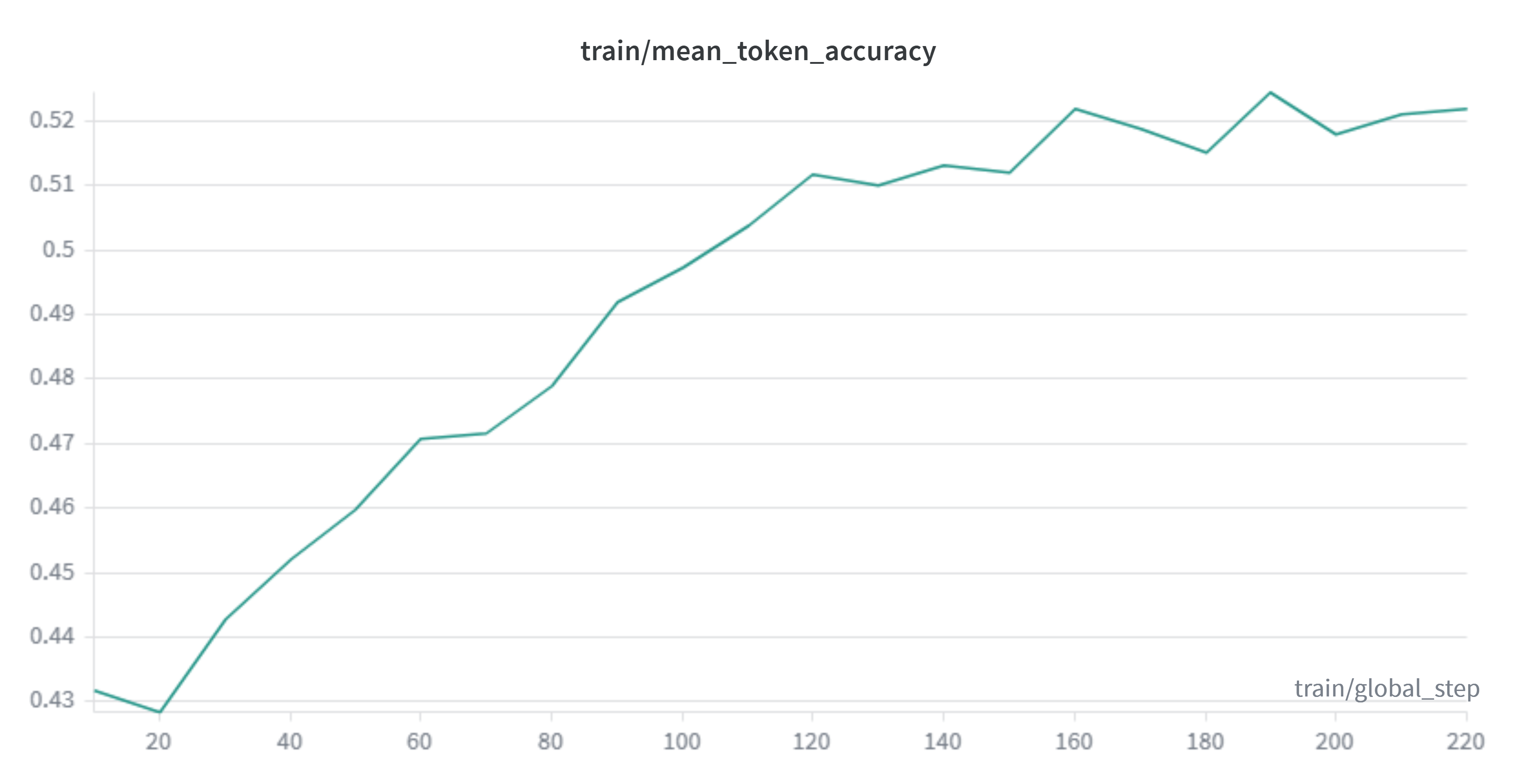
This metric (the fraction of tokens where the model's greedy prediction matches the actual token) rises from 0.432 to 0.522 on train, and from 0.462 to 0.519 on eval. It wasn't a metric I used during pre-training, but it makes sense here: it directly measures how often the model "gets right" the next token of the conversation format, something more concrete than perplexity for judging whether the SFT is teaching the expected turn-taking pattern.
Learning rate and gradient norm
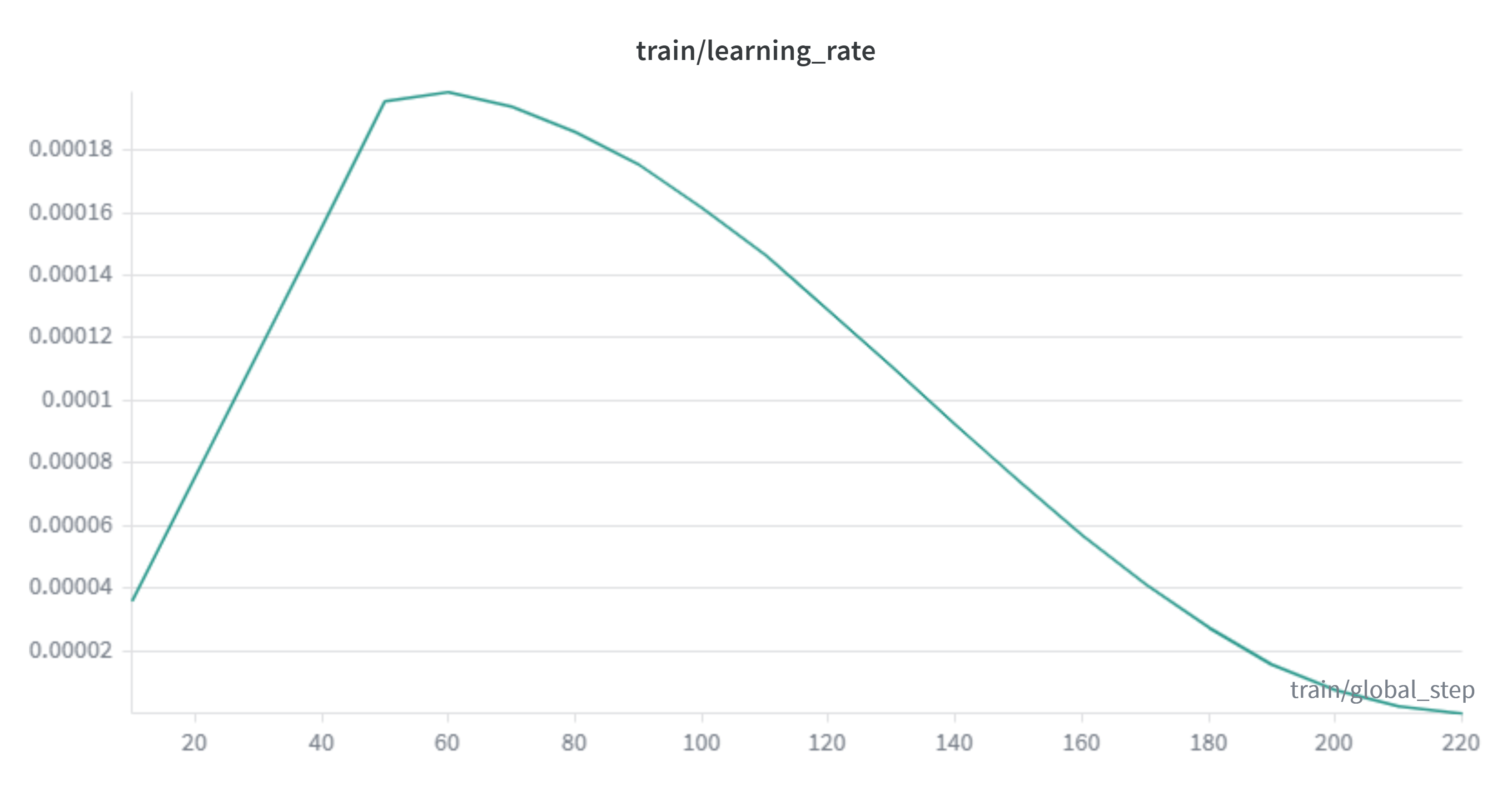 | 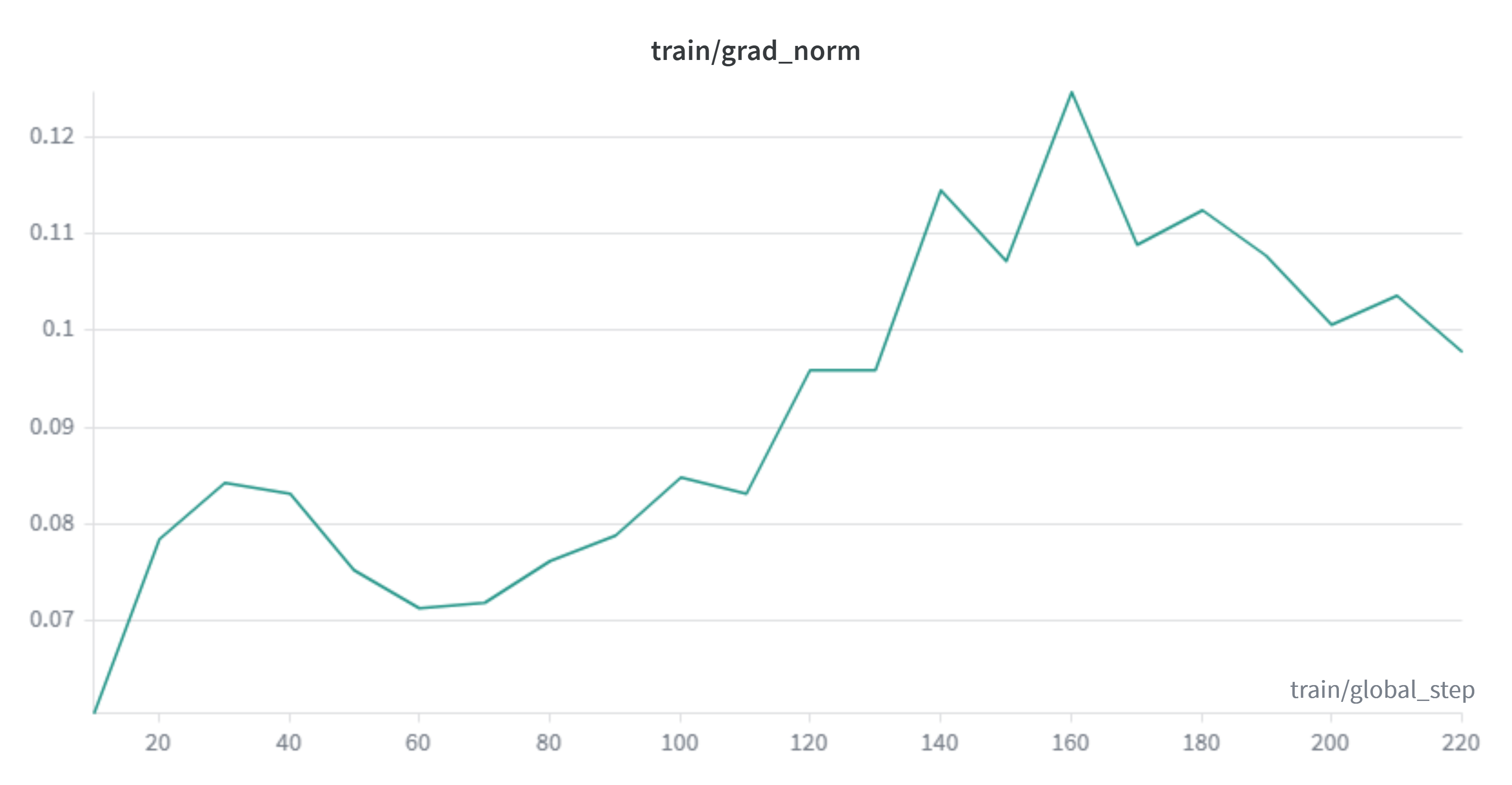 |
The learning rate follows the expected schedule: it rises during the 50-step warmup up to a peak of 1.99e-4 (step 60, very close to the configured lr=2e-4) and decays on a cosine curve down to practically 0 by step 220. grad_norm stays between 0.06 and 0.12 for the entire run, well below the configured max_grad_norm=0.8. Clipping never actually kicked in, and there were no instability spikes like the ones seen during pre-training.
Hardware usage
The run processed 22,769,527 tokens in total on the H100, at an average speed of 13,757 tokens per second, considerably below the ~44,600 tok/s from pre-training. That makes sense: there's LoRA overhead here, batches with variable-length sequences (without packing into fixed 2048-token blocks like in pre-training), and evaluation pauses every 50 steps.
Validation after post-training
With the LoRA adapter merged (merge_and_save()), I ran a test inference using the chat template instead of the plain completion prompt I used to validate pre-training. This time it actually makes sense: the model has now gone through SFT, so it should respond like an assistant.
from transformers import AutoTokenizer, AutoModelForCausalLM
MODEL_NAME = "merged_model"
tok = AutoTokenizer.from_pretrained(MODEL_NAME)model = AutoModelForCausalLM.from_pretrained(MODEL_NAME)model.to("cuda:0")model.eval()
messages = [    {"role": "user", "content": "Imagine you are writing a short story set in a bustling futuristic market on Mars. The protagonist, a street food vendor named Lira, is trying to attract customers with a new dish called \"Red Dust Curry\" that glows faintly in the low Martian twilight. Write a vivid, sensory‑rich paragraph describing the scene, focusing on the sights, smells, and sounds, and end with a catchy tagline for the dish that highlights its unique benefit."}]text = tok.apply_chat_template(messages, tokenize=False, add_generation_prompt=True)tokens = tok(text, return_tensors="pt").to("cuda:0")
outputs = model.generate(**tokens, do_sample=True,    temperature=0.8, repetition_penalty=1.3, max_new_tokens=50)
result = tok.decode(outputs[0], skip_special_tokens=True)print(result)
Output:
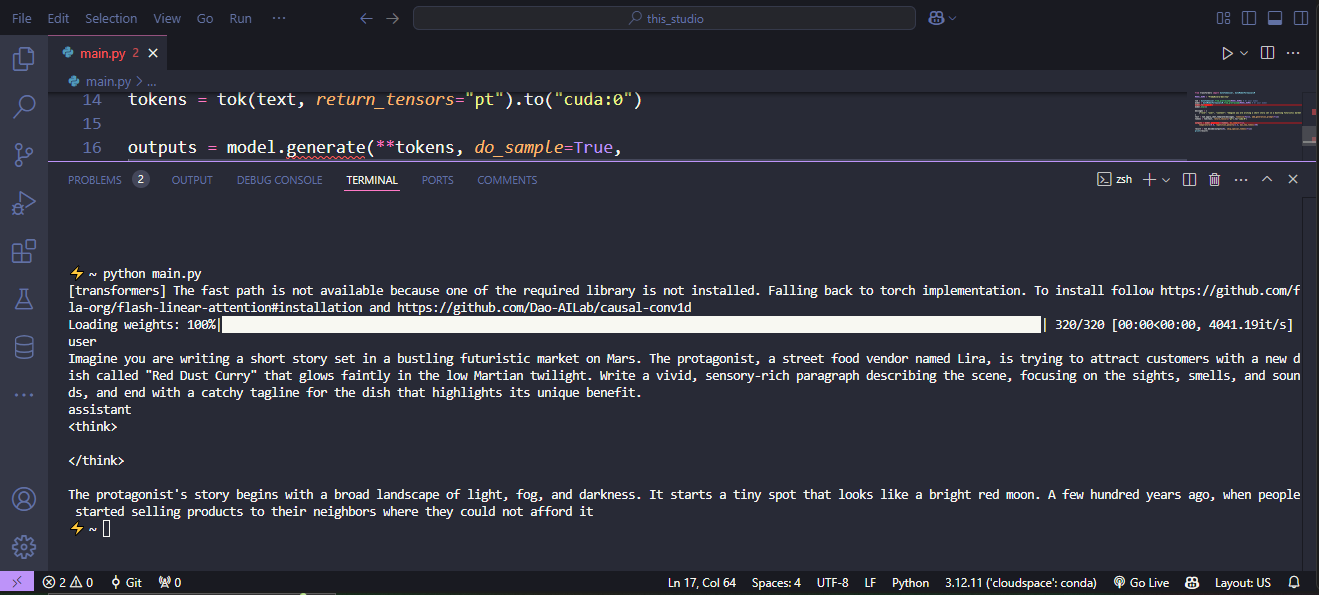
The result confirms the first thing I wanted to check: the model now respects the user / assistant turn structure of the chat template, something the pre-training-only checkpoint had no notion of at all. There, the SFT did its job: teaching format on top of what the model already knew.
But there's something more specific to this dataset worth pointing out: the model opens and closes a completely empty <think></think> block before answering. GLM-5.2-Conversation includes explicit chain-of-thought reasoning, so the model learned the shape of that pattern (opening a thinking block before the final answer), but not how to fill it with anything. It's the same underlying problem we've been carrying since pre-training, now applied to one more layer of format: imitating the structure without the content that's supposed to go inside it.
The text that follows the </think> doesn't resolve the prompt either: it doesn't mention Lira, the Martian market, or the "Red Dust Curry," and it never gets to a tagline because max_new_tokens=50 cuts the generation short. It does maintain correct English syntax (agreement, sentence structure), in line with what we already saw during pre-training validation: the model generates grammatically valid prose with no thematic coherence to the prompt.
In short, the SFT with LoRA did exactly what was expected of it in this experiment: it taught the model the mechanics of conversation (turns, and even the shape of a reasoning block) without being able to make up for the semantic gap that comes from having seen only 2.12% of one epoch during pre-training. This confirms the note I left at the start of the post-training section: the real bottleneck was never the fine-tuning method, it was the incomplete pre-training.
Conclusion
We started almost from zero: we didn't implement the model architecture (we used Qwen3.5's as exposed by Transformers as-is), but we did build the rest of the pipeline end to end, dataset collection and tokenization, cost-efficiency benchmark across GPUs, pre-training, inference validation, SFT with LoRA, and post-training validation. That was the real goal from the start: understanding how the pieces fit together to build an LLM.
The limited budget shaped the project at every decision: the 0.8B size, the 15B tokens in the dataset instead of a larger scale, pre-training cut off at 2.12% of an epoch, the subset of around 4,950 examples for the SFT. Every number in this post has that budget constraint behind it. Even so, the full pipeline ran without errors across both phases, loaded the tokenized dataset, trained, evaluated, saved checkpoints, and generated syntactically valid text in both languages, which is exactly what you can reasonably expect from an experiment of this size.
There are two open paths left if anyone wants to continue this. The most direct one is completing a real pre-training run over the full 15B tokens (or more), which would already solve most of the semantic problem that keeps showing up throughout the post. The second is applying the post-training techniques I noted but didn't cover: YaRN for context extension is viable even on a tight budget, given that its authors report competitive results with less than 0.1% of the pre-training data. GRPO (or a variant like DAPO) is more questionable for a project this size, not so much because of the method itself, but because of what it requires to set up around it: a generation environment, a reward verifier, and considerably more compute than what was already spent here.
All the code used (architecture, tokenization, benchmark, training, SFT) is in the GitHub repository, along with the base and tokenized datasets on HuggingFace, in case anyone wants to pick it up from where I left off.
References
Architecture and model components
- Qwen3.5 (model collection): https://huggingface.co/collections/Qwen/qwen35
- Gated DeltaNet: https://arxiv.org/abs/2412.06464
- Meta, "Introducing Meta Llama 3": https://ai.meta.com/blog/meta-llama-3/
Data and scaling
- Hoffmann et al., "Training Compute-Optimal Large Language Models" (Chinchilla), 2022: https://arxiv.org/abs/2203.15556
- OpenBMB/UltraX-Preview: https://huggingface.co/datasets/openbmb/UltraX-Preview
- UltraX framework: https://arxiv.org/abs/2607.08646
- HuggingFaceFW/FineWeb2: https://huggingface.co/datasets/HuggingFaceFW/fineweb-2
- Aquiles-ai/TinyQwen-Data (own dataset): https://huggingface.co/datasets/Aquiles-ai/TinyQwen-Data
- Aquiles-ai/TinyQwen-Data-Tokenized (tokenized dataset): https://huggingface.co/datasets/Aquiles-ai/TinyQwen-Data-Tokenized
- ianncity/GLM-5.2-Conversation: https://huggingface.co/datasets/ianncity/GLM-5.2-Conversation
Infrastructure and libraries
- Modal: https://modal.com/
- Hugging Face TRL: https://github.com/huggingface/trl
- Hugging Face PEFT: https://github.com/huggingface/peft
Post-training (context, not implemented in this project)
- Peng et al., "YaRN: Efficient Context Window Extension of Large Language Models", 2023: https://arxiv.org/pdf/2309.00071
- Shao et al., "DeepSeekMath: Pushing the Limits of Mathematical Reasoning in Open Language Models" (GRPO), 2024: https://arxiv.org/abs/2402.03300
- DeepSeek-AI, "DeepSeek-R1: Incentivizing Reasoning Capability in LLMs via Reinforcement Learning", 2025: https://arxiv.org/abs/2501.12948
Author's previous projects
- Rivera-ai/ZeusLLM: https://github.com/Rivera-ai/ZeusLLM
- LLaDA-from-scratch (reimplementation): https://github.com/FredyRivera-dev/LLaDA-from-scratch
- Nie et al., "LLaDA" (paper reimplemented in the previous project): https://arxiv.org/abs/2502.09992
This project
- Aquiles-ai/TinyQwen (repository): https://github.com/Aquiles-ai/TinyQwen